US Real Estate Regression

Python
Data Science
Author

Mohammad Savarmand

Published

2025 December 8

Introduction

Dataset

The chosen dataset contains over 2.2 million residential real estate listings from across the United States, collected from Realtor.com in 2024 and organized by state and zipcode. Each record includes property details such as listing status, price, number of bedrooms and bathrooms, lot size (acre_lot), house size (living area in square feet), and location information (city, state, zip_code). The data includes both current listings and recently sold homes, making it suitable for housing price prediction and analysis of how property attributes and location relate to price.

Since each listing includes the state in which the property is located, I added publicly available state-level political affiliation data to the dataset. This allows me to examine potential patterns or differences in housing prices across states with different political leanings, adding another layer of context to the analysis.

Goal

The goal of this project is to develop a regression model that predicts house prices based on their features and current market trends. Since the current dataset does not capture all factors that affect house pricing, the model is intended only to assist real estate agents in setting fair and competitive listing prices. The intended workflow is:

  1. The realtor enters a new property’s features (e.g., number of bedrooms, bathrooms, living area, location, etc.)
  2. The model outputs a predicted price based on the trained dataset.
  3. The realtor can then adjust the suggested price further based on factors not captured in the dataset.

Data Preprocessing

Load data

Code
import pandas as pd
import numpy as np
import seaborn as sns
import matplotlib.pyplot as plt
import xgboost as xgb
import optuna
import warnings
warnings.filterwarnings("ignore", message="IProgress not found")

# Hide warning output
import os
os.environ["XGBOOST_DISABLE_STDOUT_REDIRECTION"] = "1"
os.environ["XGBOOST_PLUGINS"] = ""
/nix/store/3h9ki7gg02mrkaln0dfdqymqzhwixwv4-python3-3.12.11-env/lib/python3.12/site-packages/tqdm/auto.py:21: TqdmWarning:

IProgress not found. Please update jupyter and ipywidgets. See https://ipywidgets.readthedocs.io/en/stable/user_install.html
Code
df = pd.read_csv("files/realtor-data.csv")
party_df = pd.read_csv("files/state_party.csv")

df = df[df["state"] != "New Brunswick"]
df = df.merge(party_df, on="state", how="left")
df["party"] = df["party"].replace({"PNP": "Other"}).fillna("Other")

Casting

String to Datetime to Int32

Code
c = "prev_sold_date"

df[c] = pd.to_datetime(df[c], errors="coerce")

df[f"psd_year"]       = df[c].dt.year.astype("Int32")
df[f"psd_month"]      = df[c].dt.month.astype("Int32")
df[f"psd_day"]        = df[c].dt.day.astype("Int32")
df[f"psd_dayofweek"]  = df[c].dt.dayofweek.astype("Int32")
df[f"psd_days_since"] = (
                        (pd.Timestamp.today().normalize() - df[c])
                        .dt.days.astype("Int32")
                        )

df = df.drop(columns=[c])

Object to Categorical

Code
label_cols = ['status', 'party']
for col in label_cols:
    df[col] = df[col].astype('category')

Preparing Data

Handling Missing Values

Code
def summarize_null_type(df: pd.DataFrame) -> pd.DataFrame:
    summary = pd.DataFrame({
        "missing": df.isna().sum(),
        "non_missing": df.notna().sum(),
        "dtype": df.dtypes
    })
    return summary
Code
summarize_null_type(df)
missing non_missing dtype
brokered_by 4533 2221848 float64
status 0 2226381 category
price 1541 2224840 float64
bed 481316 1745065 float64
bath 511770 1714611 float64
acre_lot 325589 1900792 float64
street 10866 2215515 float64
city 1407 2224974 object
state 8 2226373 object
zip_code 299 2226082 float64
house_size 568483 1657898 float64
party 0 2226381 category
psd_year 734298 1492083 Int32
psd_month 734298 1492083 Int32
psd_day 734298 1492083 Int32
psd_dayofweek 734298 1492083 Int32
psd_days_since 734298 1492083 Int32
Code
df2 = df.dropna()
summarize_null_type(df2)
missing non_missing dtype
brokered_by 0 1084909 float64
status 0 1084909 category
price 0 1084909 float64
bed 0 1084909 float64
bath 0 1084909 float64
acre_lot 0 1084909 float64
street 0 1084909 float64
city 0 1084909 object
state 0 1084909 object
zip_code 0 1084909 float64
house_size 0 1084909 float64
party 0 1084909 category
psd_year 0 1084909 Int32
psd_month 0 1084909 Int32
psd_day 0 1084909 Int32
psd_dayofweek 0 1084909 Int32
psd_days_since 0 1084909 Int32

Outliers

Code
def quantile_increase(series, q=0.99):
    mean_val = series.mean()
    quant_val = series.quantile(q)
    return (quant_val - mean_val) / mean_val * 100
Code
df_num = df2.select_dtypes(include="number")

q = np.array([0.99, 0.999, 0.9999])

df_summary = pd.DataFrame({
    "column": df_num.columns,
    "mean": df_num.mean().values,
    f"{q[0]*100}th%": df_num.quantile(q[0]).values,
    f"{q[1]*100}th%": df_num.quantile(q[1]).values,
    f"{q[0]*100}th%_inc": df_num.apply(
        lambda s: quantile_increase(s, q=q[0])
    ).values,
    f"{q[1]*100}th%_inc": df_num.apply(
        lambda s: quantile_increase(s, q=q[1])
    ).values,
})

df_summary.round(2)
column mean 99.0th% 99.9th% 99.0th%_inc 99.9th%_inc
0 brokered_by 53576.78 109974.0 110059.0 105.26 105.42
1 price 568704.13 3500000.0 12750000.0 515.43 2141.94
2 bed 3.36 6.0 12.0 78.39 256.78
3 bath 2.52 6.0 11.0 138.12 336.55
4 acre_lot 11.95 19.63 199.41 64.21 1568.13
5 street 929106.47 1822626.92 1930898.38 96.17 107.82
6 zip_code 55891.84 98625.0 99349.0 76.46 77.75
7 house_size 2074.97 6300.0 12250.64 203.62 490.40
8 psd_year 2017.4 2022.0 2022.0 0.23 0.23
9 psd_month 5.98 12.0 12.0 100.58 100.58
10 psd_day 16.36 31.0 31.0 89.45 89.45
11 psd_dayofweek 2.2 4.0 6.0 82.04 173.06
12 psd_days_since 2992.78 14116.0 19451.0 371.67 549.93
Code
q = np.array([1-0.99,1-0.999,1-0.9999]).round(4)

df_summary = pd.DataFrame({
    "column": df_num.columns,
    "mean": df_num.mean().values,
    f"{q[0]*100}st%": df_num.quantile(q[0]).values,
    f"{q[1]*100}st%": df_num.quantile(q[1]).values,
    f"{q[0]*100}st%_inc": df_num.apply(
        lambda s: quantile_increase(s, q=q[0])
    ).values,
    f"{q[1]*100}st%_inc": df_num.apply(
        lambda s: quantile_increase(s, q=q[1])
    ).values,
})

df_summary.round(2)
column mean 1.0st% 0.1st% 1.0st%_inc 0.1st%_inc
0 brokered_by 53576.78 1764.0 189.0 -96.71 -99.65
1 price 568704.13 54000.0 19900.0 -90.50 -96.50
2 bed 3.36 1.0 1.0 -70.27 -70.27
3 bath 2.52 1.0 1.0 -60.31 -60.31
4 acre_lot 11.95 0.02 0.0 -99.83 -100.00
5 street 929106.47 30464.08 9216.63 -96.72 -99.01
6 zip_code 55891.84 1852.0 1035.0 -96.69 -98.15
7 house_size 2074.97 688.0 461.0 -66.84 -77.78
8 psd_year 2017.4 1987.0 1972.0 -1.51 -2.25
9 psd_month 5.98 1.0 1.0 -83.29 -83.29
10 psd_day 16.36 1.0 1.0 -93.89 -93.89
11 psd_dayofweek 2.2 0.0 0.0 -100.00 -100.00
12 psd_days_since 2992.78 1357.0 1208.0 -54.66 -59.64

Outliers Reasoning

It seems reasonable to keep all data points between the 0.1st and 99th percentiles based on how extreme the percent changes are from the mean. On the upper end, including houses up to around 6 bedrooms makes sense because the model performs best on “normal” homes rather than extreme luxury properties.

On the lower end, the 0.1st percentile includes a home priced at about $19,900. Given that different states have very different housing markets, using roughly $20k as a practical minimum does not seem unreasonable.

Overall, the justification for outlier removal in this project is not particularly strict, so trimming values above the 99th percentile and below the 0.1st percentile is unlikely to harm model performance in any meaningful way.

Code
cols = ["price", "bed", "bath", "acre_lot", "house_size"]
q001 = df2[cols].quantile(0.001)
q99 = df2[cols].quantile(0.99)

# Filter rows above 99th percentile 
# and filter rows below the 0.1st percentile
df3 = df2[((df2[cols] >= q001) & (df2[cols] <= q99)).all(axis=1)]
print(f'Rows Filtered: {df2.shape[0]-df3.shape[0]}')
Rows Filtered: 38694

Exploratory Data Analysis

Correlation Heatmap

Code
df_eda = df3.copy()

numeric_df = df_eda.select_dtypes(include=["number"])
numeric_df = numeric_df.drop(columns=[c for c in numeric_df.columns 
                                      if c.startswith("psd_")])

corr = numeric_df.corr()

plt.figure(figsize=(12, 10))
sns.heatmap(
    corr,
    annot=True,
    fmt=".2f",
    cmap="viridis",
    linewidths=0.5
)

plt.title("Figure 1: Correlation Heatmap \
    (Excluding prev_sold_date Features)",
fontsize=16)
plt.tight_layout()
plt.show()

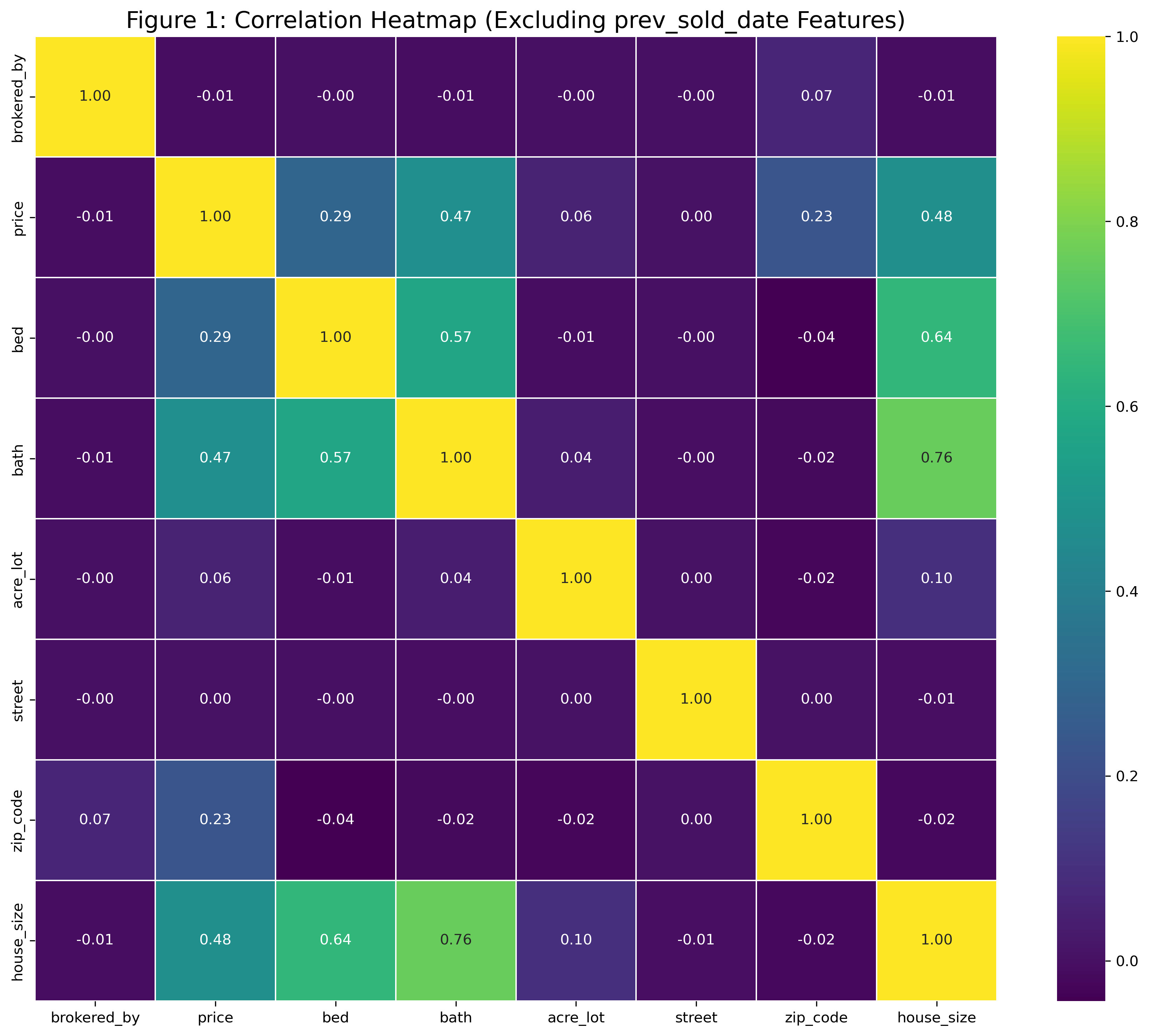
The correlation heatmap (Figure 1) above was created to get a general sense of which features are most related to house price. The results showed that house size, number of bedrooms, and number of bathrooms had the strongest relationships with price. Therefore, the visualizations will focus on these three features.

State Level Housing Market Comparison

Ordered by Average Price

Code
warnings.filterwarnings("ignore", category=FutureWarning)

# Party color map
party_colors = {
    "Democrat": "blue",
    "Republican": "red",
    "Other": "gray"
}

# Compute ordering based on mean price (descending)
state_order = (
    df_eda.groupby("state")["price"]
      .mean()
      .sort_values(ascending=False)
      .index
)

# Compute counts
state_counts = df_eda["state"].value_counts().reindex(state_order)

# Create per-state color mapping
state_party = (
    df_eda.drop_duplicates("state")
      .set_index("state")["party"]
      .reindex(state_order)
)

color_map = dict(zip(
    state_order, 
    state_party.map(party_colors).fillna("gray")
    ))

n = 1
plt.figure(figsize=(14*n, 14*n))

# Price
plt.subplot(3, 1, 1)
sns.boxplot(
    data=df_eda,
    x="state", y="price",
    order=state_order,
    showfliers=False,
    hue="state",
    palette=color_map,
    legend=False
)
plt.title("Figure 2: House Price by State | Descending Mean Price")
plt.xticks(rotation=90)

# House Size
plt.subplot(3, 1, 2)
sns.boxplot(
    data=df_eda,
    x="state", y="house_size",
    order=state_order,
    showfliers=False,
    hue="state",
    palette=color_map,
    legend=False
)
plt.title("House Size by State | Same Order")
plt.xticks(rotation=90)

# Counts
plt.subplot(3, 1, 3)
sns.barplot(
    x=state_counts.index,
    y=state_counts.values,
    order=state_order,
    hue=state_counts.index,
    palette=color_map,
    legend=False
)
plt.title("Number of Listings by State (Same Order)")
plt.ylabel("Count")
plt.xticks(rotation=90)

plt.tight_layout()
plt.show()

Ordered by Average IQR

Code
# Party color map
party_colors = {
    "Democrat": "blue",
    "Republican": "red",
    "Other": "gray"
}

# Compute IQR for ordering 
q1 = df_eda.groupby("state")["price"].quantile(0.25)
q3 = df_eda.groupby("state")["price"].quantile(0.75)
iqr = q3 - q1
state_order = iqr.sort_values(ascending=False).index

# Compute counts
state_counts = df_eda.groupby("state")["price"].size().reindex(state_order)

# Build per-state color mapping
state_party = (
    df_eda.drop_duplicates("state")
      .set_index("state")["party"]
      .reindex(state_order)
)

color_map = dict(zip(
    state_order, 
    state_party.map(party_colors).fillna("gray")
    ))

n=1
plt.figure(figsize=(14*n, 14*n))

# Price
plt.subplot(3, 1, 1)
sns.boxplot(
    data=df_eda,
    x="state", y="price",
    order=state_order,
    showfliers=False,
    hue="state",
    palette=color_map,
    legend=False
)
plt.title("Figure 3: House Price by State | Ordered by Descending IQR")
plt.xticks(rotation=90)

# House Size
plt.subplot(3, 1, 2)
sns.boxplot(
    data=df_eda,
    x="state", y="house_size",
    order=state_order,
    showfliers=False,
    hue="state",
    palette=color_map,
    legend=False
)
plt.title("House Size by State | Same Order")
plt.xticks(rotation=90)

# Counts
plt.subplot(3, 1, 3)
sns.barplot(
    x=state_counts.index,
    y=state_counts.values,
    order=state_order,
    hue=state_counts.index,
    palette=color_map,
    legend=False
)
plt.title("Number of Houses by State (Same Order)")
plt.ylabel("Count")
plt.xticks(rotation=90)

plt.tight_layout()
plt.show()

Interpretation of Boxplot Graphs

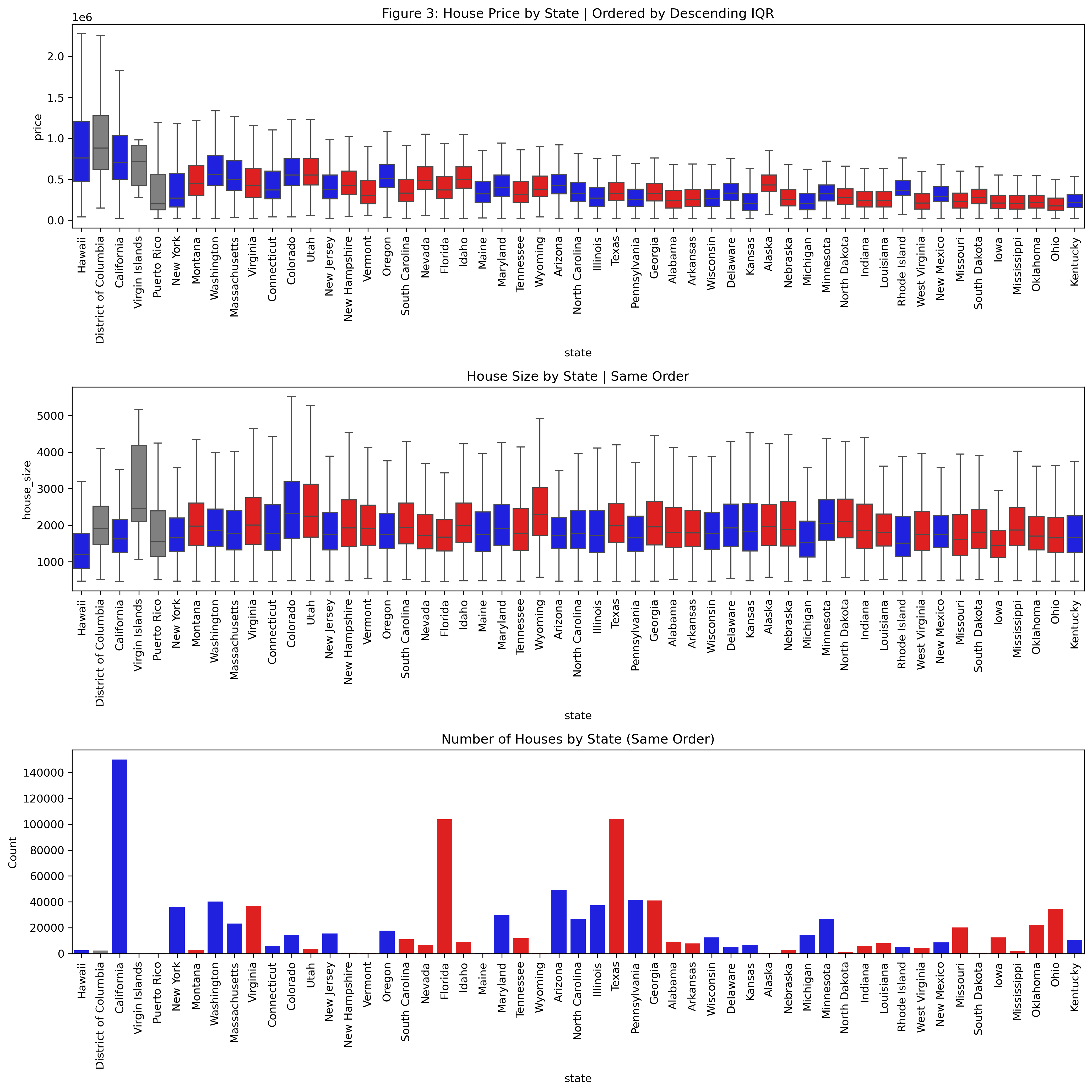
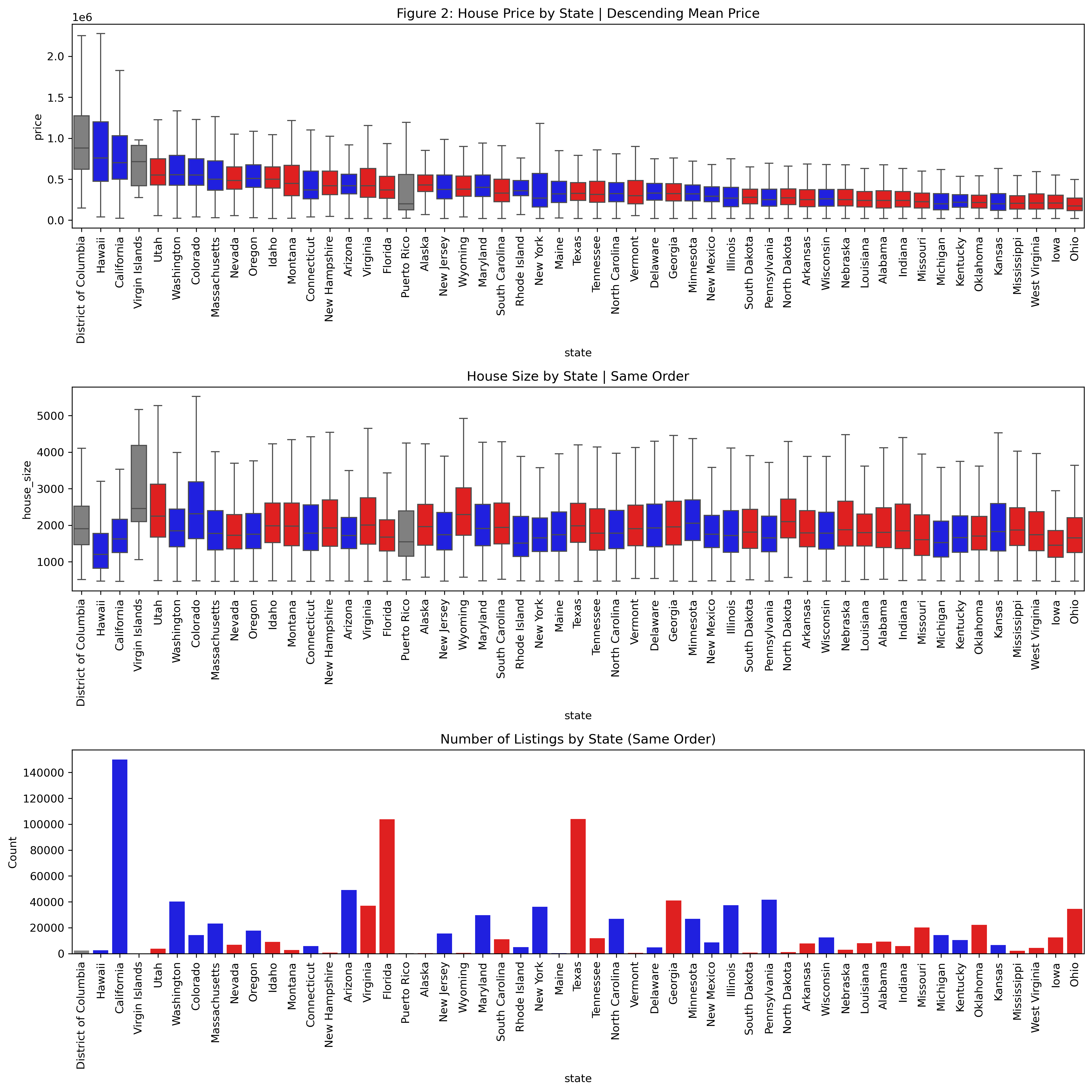
The multi-panel visualizations (Figure 2 and 3) above provide a straightforward way to compare housing markets across states. The first plot ranks states by their average house price, going left to right, giving a quick snapshot of where prices tend to be higher or lower. The boxplots also show how volatile prices are within each state, which helps reveal whether a state has a wide range of housing options or a more uniform market.

The second plot uses the exact ordering as the top graph to show the distribution of house sizes. This makes it easy to see whether states with higher prices also tend to have larger homes, or whether the price differences come from other factors.

The final bar plot shows how many total listings each state has. This helps explain some of the variation seen in the price and size boxplots, since states with more listings naturally show more spread in their distributions.

With this combination of graphs, a realtor can extract several useful insights. One clear pattern is that red states tend to have lower and less volatile home prices overall. This type of information can be valuable during pricing discussions or negotiations, since it provides context about what is typical or reasonable within a given market.

Table Summary

Code
summary = (
    df_eda.groupby("state")
      .agg(
          count=("price", "size"),
          mean_price=("price", "mean"),
          q1_price=("price", lambda x: x.quantile(0.25)),
          q3_price=("price", lambda x: x.quantile(0.75))
      )
)

summary["iqr_price"] = summary["q3_price"] - summary["q1_price"]
summary = summary.map(
    lambda x: f"{x:.2e}" if isinstance(x, (int, float)) else x
)
summary.sort_values(by=["count"], ascending = False).head(5)
count mean_price q1_price q3_price iqr_price
state
Alabama 9.26e+03 2.91e+05 1.50e+05 3.60e+05 2.10e+05
Idaho 8.97e+03 5.77e+05 3.90e+05 6.51e+05 2.61e+05
New Mexico 8.68e+03 3.62e+05 2.25e+05 4.08e+05 1.83e+05
Louisiana 8.08e+03 2.95e+05 1.62e+05 3.50e+05 1.88e+05
Arkansas 7.77e+03 3.02e+05 1.65e+05 3.74e+05 2.08e+05

If the user wants the exact numerical values behind these trends, they can refer to the summary table above. By adjusting the two arguments in the sort_values() method, they can easily sort the table by whichever metric they are interested in.

Average Price vs Bed vs Bath Heatmap

Code
bb_stats = (
    df_eda.groupby(["bed", "bath"], observed=True)
         .agg(
             mean_price=("price", "mean"),
             n=("price", "size")
         )
         .reset_index()
)

# Pivot to bed x bath grid of mean price
heat_data = bb_stats.pivot(index="bed", columns="bath", values="mean_price")

# Heatmap
plt.figure(figsize=(8, 6))
sns.heatmap(
    heat_data,
    annot=True,
    fmt=".0f",
    cmap="viridis",
    cbar_kws={"label": "Average Price ($)"}
)

plt.title("Figure 4: Average House Price by Bed/Bath Combination")
plt.xlabel("Bathrooms")
plt.ylabel("Bedrooms")
plt.tight_layout()
plt.show()

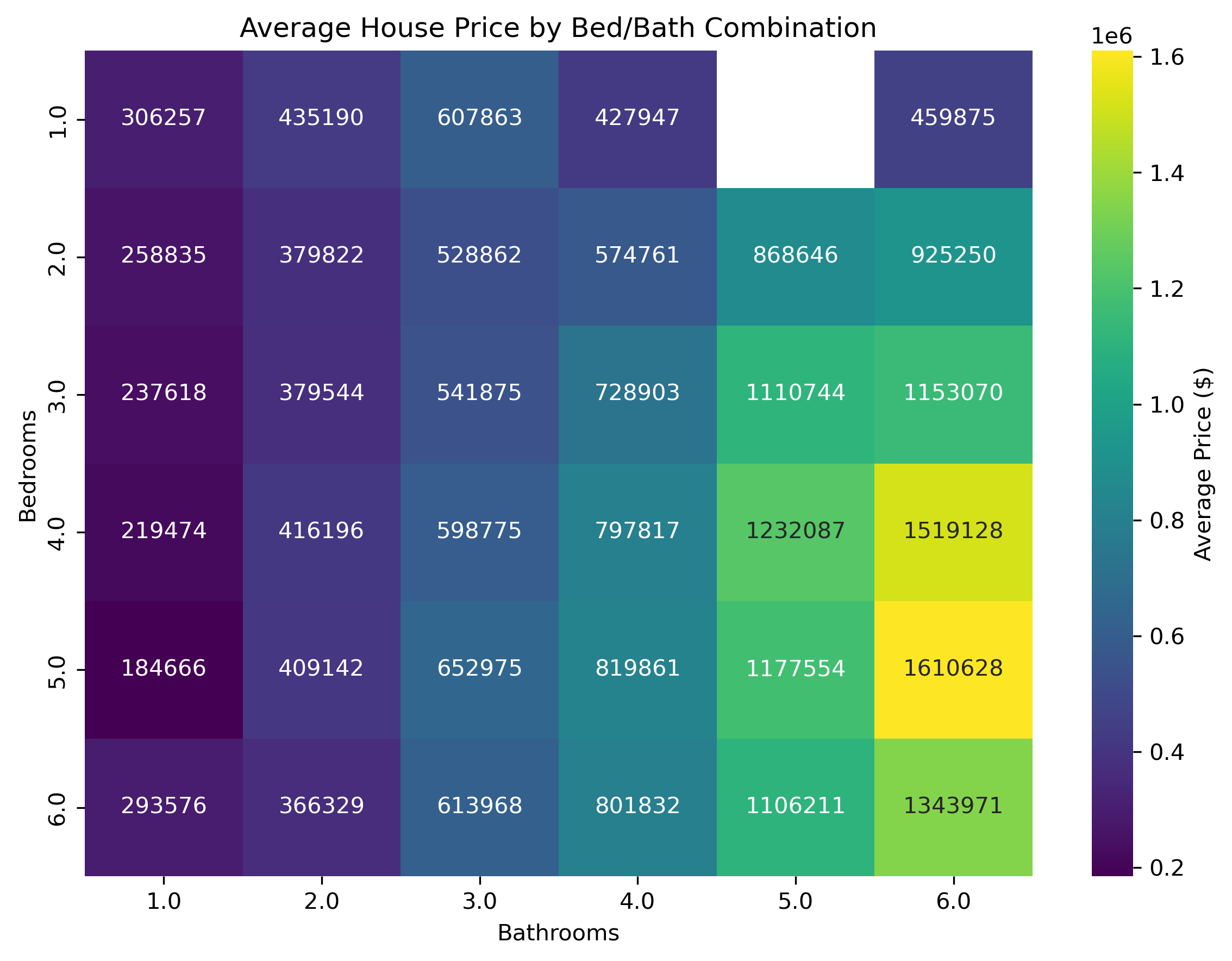
Up to this point, the analysis has examined house-size visualizations to understand general trends. Next, this analysis examines how the number of bedrooms and bathrooms relates to price. A correlation heatmap turned out to be the most effective way to do this. In the heatmap (Figure 4), we see a smooth gradient from left to right and top to bottom, confirming the expectation that increases in both bedrooms and bathrooms are associated with higher house prices.

Visualization Summary

Figure 1: Correlation Heatmap

  • Key Takeaway: Physical interior features (size, beds, baths) matter far more for price than exterior or location encodings in this dataset.

Figure 2: State-Level Comparison (Ordered by Mean Price)

  • Democrat-leaning states generally have higher average housing prices, likely because they contain more urbanized areas. This gives confidence that the dataset reflects real-world market patterns.

  • Despite the expectation that homes in Republican-leaning (more rural) states would be larger due to greater land availability, the filtered dataset shows little difference in house sizes between parties.

  • Key Takeaway: States with Democratic affiliation tend to have higher overall home prices, which may be due to greater urbanization and higher housing demand, not the party label itself.

Figure 3: State-Level Comparison (Ordered by IQR or Volatility)

  • Key Takeaway: Many of the least volatile housing markets are Republican-leaning states, which suggests that their economic conditions, policies, or rural structure may contribute to more stable home prices. However, these causal interpretations come from loose and shaky visual inference which means further investigation beyond this dataset is necessary.

Figure 4: Bed, Bath, Average Price Heatmap

  • Key Takeaway: As expected, there is a smooth monotonic gradient from left to right and top to bottom which says if you increase the bed or bathroom counts, expect the average price to increase.

Modeling

Model Sweep

Code
from sklearn.preprocessing import LabelEncoder

df_model = df3.copy()

# Cast city and state as objects (for one-hot encoding later)
for col in ['city', 'state']:
    df_model[col] = df_model[col].astype('object')

# Label encode status and party
for col in ['status', 'party']:
    le = LabelEncoder()
    df_model[col] = le.fit_transform(df_model[col].astype(str))
Code
from sklearn.model_selection import train_test_split

df_sample = df_model.sample(n=800, random_state=42)

X = df_sample.loc[:, df_sample.columns != "price"]
y = df_sample.loc[:, ["price"]]

X_train, X_test, y_train, y_test = train_test_split(
    X, y, 
    test_size=0.25, 
    random_state=0
)
Code
cat_cols = df_model.select_dtypes(include=[object]).columns

# One-hot with pandas
X_train_oh = pd.get_dummies(X_train, columns = cat_cols, drop_first=False)
X_test_oh  = pd.get_dummies(X_test,  columns = cat_cols, drop_first=False)

X_test_oh = X_test_oh.reindex(columns=X_train_oh.columns, fill_value=0)

X_test_oh.shape
Code
import warnings
from sklearn.exceptions import DataConversionWarning, ConvergenceWarning

# Hide "column-vector y" warning
warnings.filterwarnings(
    "ignore",
    category=DataConversionWarning,
)

# Hide all convergence warnings
warnings.filterwarnings(
    "ignore",
    category=ConvergenceWarning,
)
Code
from datetime import datetime
from sklearn.model_selection import cross_val_score, KFold

from sklearn.preprocessing import StandardScaler
from sklearn.compose import ColumnTransformer
from sklearn.pipeline import Pipeline

from sklearn.tree import DecisionTreeRegressor
from sklearn.ensemble import AdaBoostRegressor
from sklearn.linear_model import LinearRegression, Ridge, Lasso
from sklearn.ensemble import RandomForestRegressor, GradientBoostingRegressor
from sklearn.svm import LinearSVR, SVR
from sklearn.neighbors import KNeighborsRegressor
from sklearn.neural_network import MLPRegressor
import time

def with_scaler(model, needs_scaler):
    return model if not needs_scaler else Pipeline([
        ("scaler", StandardScaler(with_mean=False)), 
        ("model", model)
    ])

start_time = time.time()

regressors = {
    "Linear": LinearRegression(),
    "Ridge": Ridge(random_state=0),
    "Lasso": Lasso(random_state=0),
    "Decision Tree": DecisionTreeRegressor(random_state=0),
    "AdaBoost": AdaBoostRegressor(random_state=0),
    "Random Forest": RandomForestRegressor(random_state=0),
    "Gradient Boosting": GradientBoostingRegressor(random_state=0),
    # use LinearSVR (much faster) instead of SVR(kernel="linear")
    "Linear SVR": with_scaler(LinearSVR(
        random_state=0, 
        dual=True, 
        max_iter=5000), 
        True),
    "kNN": with_scaler(KNeighborsRegressor(
        n_jobs=-1), 
        True),
    "MLP": with_scaler(MLPRegressor(
        random_state=0, 
        max_iter=300, 
        early_stopping=True), True),
    "RBF SVR": with_scaler(SVR(
        kernel="rbf", 
        C=1.0, 
        gamma="scale"), 
        True),
}

cv = KFold(n_splits=5, shuffle=True, random_state=0)

# Run CV and collect results
results = []
for name, model in regressors.items():
    scores = cross_val_score(model, X_train_oh, y_train, cv=cv, scoring="r2")
    results.append({
        "model": name,
        "mean_r2": float(scores.mean()),
        "std_r2": float(scores.std())
    })

results_df = pd.DataFrame(results).round(3)
print(results_df)

elapsed = time.time() - start_time
print(f"Finished in {elapsed:.2f} seconds")

timestamp = datetime.now().strftime("%Y%m%d_%H%M%S")
filename = f"{timestamp}.csv"

# Save as CSV with runtime appended
# results_df.to_csv(filename, index=False)
# with open(filename, "a") as f:
#     f.write(f"\nRuntime (seconds): {elapsed:.2f}\n")

# print(f"Results saved to: {filename}")
model mean_r2 std_r2
0 Linear -16.248 19.277
1 Ridge 0.510 0.065
2 Lasso 0.381 0.100
3 Decision Tree 0.131 0.229
4 AdaBoost 0.147 0.045
5 Random Forest 0.448 0.097
6 Gradient Boosting 0.474 0.100
7 Linear SVR -0.058 0.034
8 kNN 0.162 0.065
9 MLP -1.595 0.360
10 RBF SVR -0.058 0.033

Model Sweep Analysis

The goal of the model sweep was to see how well a range of common regression algorithms handled the dataset. Running every model on the full million rows would take too long, so each model was tested on a sample of 800 rows. Ridge, Random Forest, and Gradient Boosting performed the best, which pointed toward XGBoost as a strong candidate for the final model. Although Ridge slightly outperformed the tree-based models, it offers far less flexibility and tunability than XGBoost. For this project, the ability to fine-tune the model makes XGBoost the better final choice.

XGBoost

Tuning Hyperparameters

Code
# Ensure all categoricals are proper category dtype for XGBoost
for col in ["status", "party", "city", "state"]:
    df_model[col] = df_model[col].astype("category")
Code
n = 5000
df_sample = df_model.sample(n=n, random_state=42)

# Features and target
X = df_sample.drop(columns=['price'])
y = df_sample['price']

# Train/test split (70/30)
X_train, X_test, y_train, y_test = train_test_split(
    X, y, 
    test_size=0.30, 
    random_state=42
)
Code
np.random.seed(1)

cv = KFold(n_splits=3, shuffle=True, random_state=42)

def objective(trial):
    param = {
        "max_depth": trial.suggest_int("max_depth", 3, 10), 
        "learning_rate": trial.suggest_float("learning_rate", 0.01, 0.1),
        "n_estimators": trial.suggest_int("n_estimators", 200, 1000),
        "subsample": trial.suggest_float("subsample", 0.5, 1.0), 
        "colsample_bytree": trial.suggest_float("colsample_bytree", 0.5, 1.0),
        "min_child_weight": trial.suggest_int("min_child_weight", 1, 10),
        "gamma": trial.suggest_float("gamma", 0.0, 5.0),
        "reg_alpha": trial.suggest_float("reg_alpha", 0.0, 1.0), 
        "reg_lambda": trial.suggest_float("reg_lambda", 0.0, 2.0),
        "tree_method": "hist",  

        # Non-hyperparameter related:        
        "enable_categorical": True, 
        "random_state": 1, 
        "n_jobs": -1, 
        "verbosity": 0,
    }

    model = xgb.XGBRegressor(**param)

    score = cross_val_score(
        model,
        X_train,
        y_train,
        cv=cv,
        scoring="r2",
        n_jobs=4
    ).mean()

    return score

XGBoost Hyperparameters Description

  • max_depth: Max depth of each tree

  • learning_rate: Controls how fast the model learns

  • n_estimators: Number of boosting rounds

  • subsample: Fraction of rows sampled per tree

  • colsample_bytree: Fraction of features used for each tree

  • min_child_weight: Minimum sum of instance weights needed in a leaf

  • gamma: Minimum improvement in the total objective (loss + regularization)

  • reg_alpha: L1 reg

  • reg_lambda: L2 reg

  • tree_method: Fast and supports categorical features

  • enable_categorical: Enables us to keep categorical values

  • random_state: For reproducibility

  • n_jobs: Use n cores

  • verbosity: Doesn’t output everything

Running Optuna

Code
optuna.logging.set_verbosity(optuna.logging.WARNING)

study = optuna.create_study(
   study_name="xgboost_regressor", 
   direction="maximize")
study.optimize(objective, n_trials=100, show_progress_bar=False, n_jobs=-1)

best_params = study.best_params
best_value = study.best_value

print("Best R^2 (CV mean):", best_value)
best_params_df = pd.DataFrame([best_params])
print(best_params_df)

# Save as text (JSON format)
with open("../data/best_params.json", "w") as f:
    json.dump(best_params, f, indent=4)
Code
import json
# Read from text file
with open("../data/best_params.json", "r") as f:
    best_params = json.load(f)

print(pd.DataFrame([best_params]).T)
                           0
max_depth           5.000000
learning_rate       0.056395
n_estimators      339.000000
subsample           0.988553
colsample_bytree    0.573206
min_child_weight    3.000000
gamma               1.160169
reg_alpha           0.513777
reg_lambda          1.742300

Run XGBoost Model With Optimized Hyperparameters

Code
# Features and target
X = df_model.drop(columns=['price'])
y = df_model['price']
# Train/test split (70/30)
X_train, X_test, y_train, y_test = train_test_split(
    X, y, 
    test_size=0.30, 
    random_state=42
)
Code
from sklearn.metrics import r2_score
np.random.seed(1)

best_model = xgb.XGBRegressor(
    **best_params,
    tree_method="hist",
    enable_categorical=True,
    random_state=1,
    n_jobs=-1,
    verbosity=0,
)

best_model.fit(X_train, y_train)
r2_test = r2_score(y_test, best_model.predict(X_test))

Model Evaluation

Test and Training \(R^2\)

Code
# Predictions
y_train_pred = best_model.predict(X_train)
y_test_pred  = best_model.predict(X_test)

# Metrics
metrics = {
    "set": ["train", "test"],
    "R2": [
        r2_score(y_train, y_train_pred),
        r2_score(y_test,  y_test_pred),
    ]
}
metrics_df = pd.DataFrame(metrics)
metrics_df
set R2
0 train 0.809514
1 test 0.792069

Residuals

Code
# Residuals (error = actual - predicted)
residuals = y_test - y_test_pred
Code
figsize = (12, 5)  # width, height
fig, axes = plt.subplots(1, 2, figsize=figsize)

# Plot 1
sns.scatterplot(x=y_test_pred, y=residuals, s=10, alpha=0.5, ax=axes[0])
axes[0].axhline(0, color="red", linestyle="--")
axes[0].set_title("Residuals vs Predicted Values")
axes[0].set_xlabel("Predicted Price")
axes[0].set_ylabel("Residual (Actual - Predicted)")

# Plot 2
sns.histplot(residuals, kde=True, bins=40, ax=axes[1], color="skyblue")
axes[1].axvline(0, color="red", linestyle="--")
axes[1].set_title("Distribution of Residuals")
axes[1].set_xlabel("Residual")
axes[1].set_ylabel("Count")

plt.tight_layout()

fig.savefig("residual_plots.png", format="png", bbox_inches="tight")
plt.show()

Residuals Summary

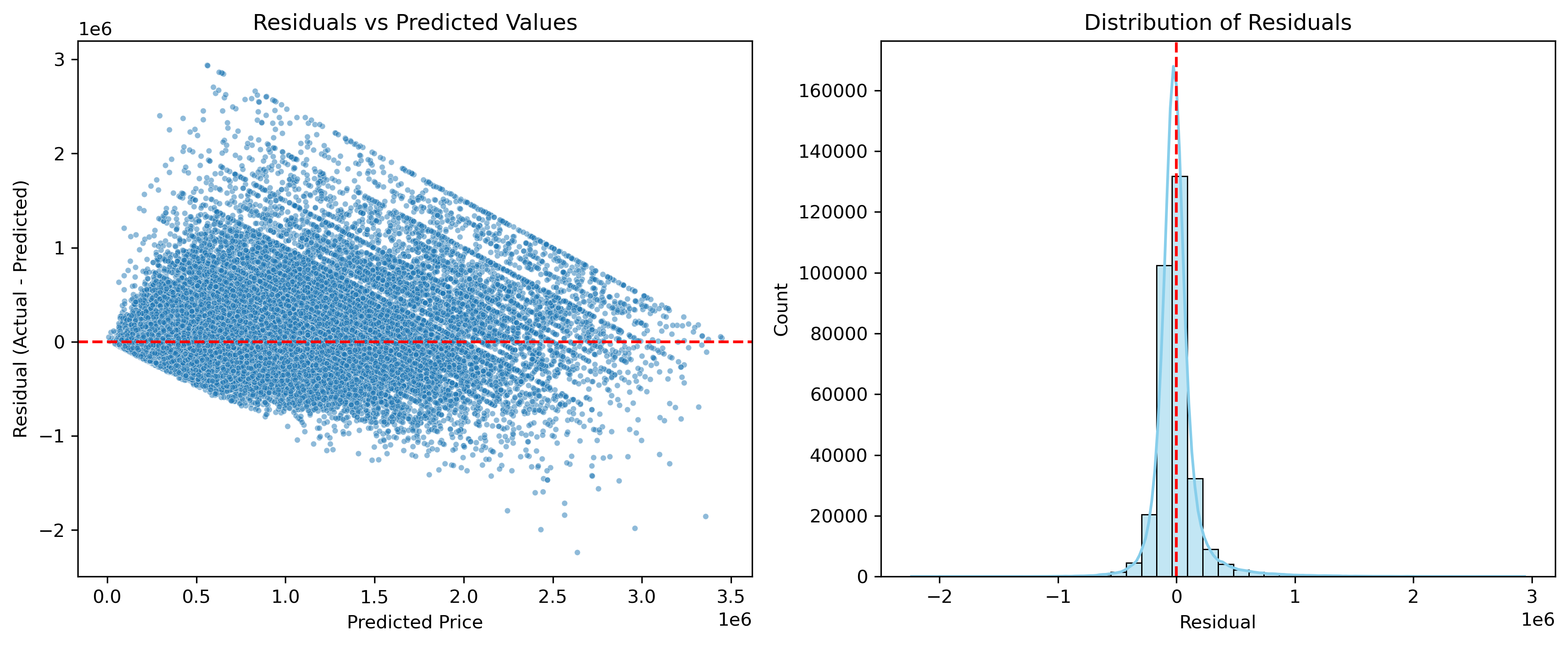
Residuals vs Predicted Values:

  • No real pattern (good)
  • No heteroskedasticity (good)
  • The residuals are centered around 0, no global bias (good)

Distribution of Residuals:

  • Normally distributed (good)
    • Symmetric
    • Bell curve
    • Unimodal
  • Peaked at around 0 (good)
  • Visually small variance relative to peak (good)

Predicted vs Actual

Code
figsize = (12, 6)   # (width, height)
fig, axes = plt.subplots(1, 2, figsize=figsize)


# Plot 1

sns.scatterplot(
    x=y_test,
    y=y_test_pred,
    s=10,
    alpha=0.5,
    ax=axes[0]
)
axes[0].plot(
    [y_test.min(), y_test.max()],
    [y_test.min(), y_test.max()],
    color="red",
    linestyle="--"
)
axes[0].set_title("Predicted vs Actual Prices")
axes[0].set_xlabel("Actual Price")
axes[0].set_ylabel("Predicted Price")


# Plot 2

n = 8000
sample_idx = np.random.choice(len(y_test), size=min(n, len(y_test)), replace=False)
x = y_test.iloc[sample_idx]
y = y_test_pred[sample_idx]

sns.kdeplot(
    x=x,
    y=y,
    fill=True,
    cmap="viridis",
    thresh=0.05,
    levels=50,
    ax=axes[1]
)
low  = min(x.min(), y.min())
high = max(x.max(), y.max())
axes[1].plot([low, high], [low, high], color="red", linestyle="--")
axes[1].set_title("Predicted vs Actual (KDE, Sampled)")
axes[1].set_xlabel("Actual Price")
axes[1].set_ylabel("Predicted Price")

plt.tight_layout()
fig.savefig("predicted_vs_actual.png", format="png", bbox_inches="tight")
plt.show()

Predicted vs Actual Summary

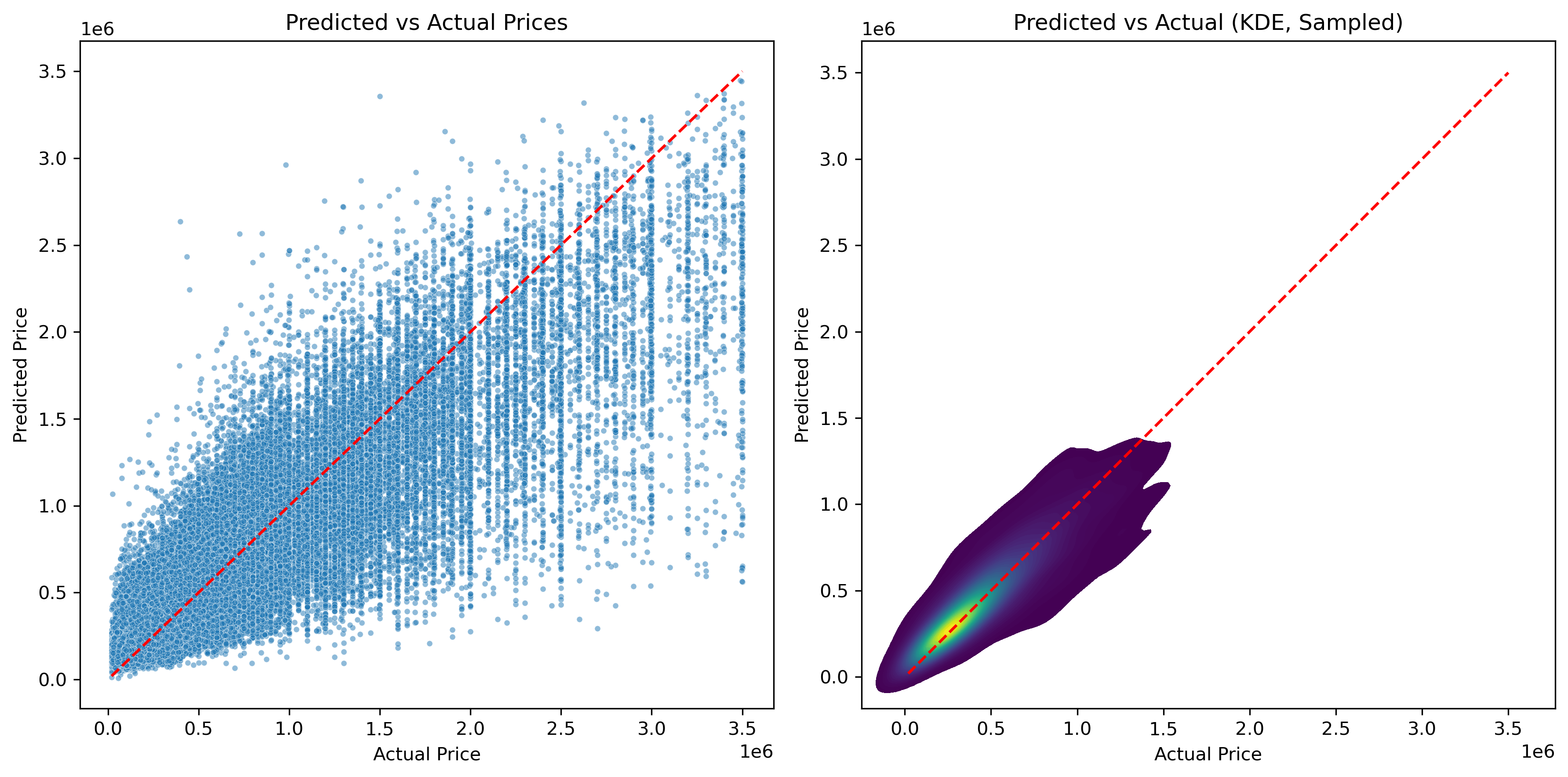
The scatterplot was expected to look somewhat scattered, but the KDE overlay shows that the datapoints generally follow the ideal line. This suggests that the predictions stay close to the actual values, which is a strong indication that the model is performing well.

Feature Importance

Code
booster = best_model.get_booster()

# XGBoost importance by "gain" 
raw_importance = booster.get_score(importance_type="gain")

feature_map = {f"f{i}": col for i, col in enumerate(X_train.columns)}
importance_items = []

for fname, score in raw_importance.items():
    nice_name = feature_map.get(fname, fname)
    importance_items.append((nice_name, score))

fi_df = (
    pd.DataFrame(importance_items, columns=["feature", "gain_importance"])
    .sort_values("gain_importance", ascending=False)
    .reset_index(drop=True)
)
Code
top_n = 20

fig, ax = plt.subplots(figsize=(8, 6))
sns.barplot(
    data=fi_df.head(top_n),
    x="gain_importance",
    y="feature",
    orient="h",
    ax=ax
)
ax.set_title(f"Top {top_n} Feature Importances (Gain)")
ax.set_xlabel("Importance (Gain)")
ax.set_ylabel("Feature")
plt.tight_layout()

fig.savefig("feature_importance.png", format="png", bbox_inches="tight")
plt.show(fig)

Feature Importance Summary

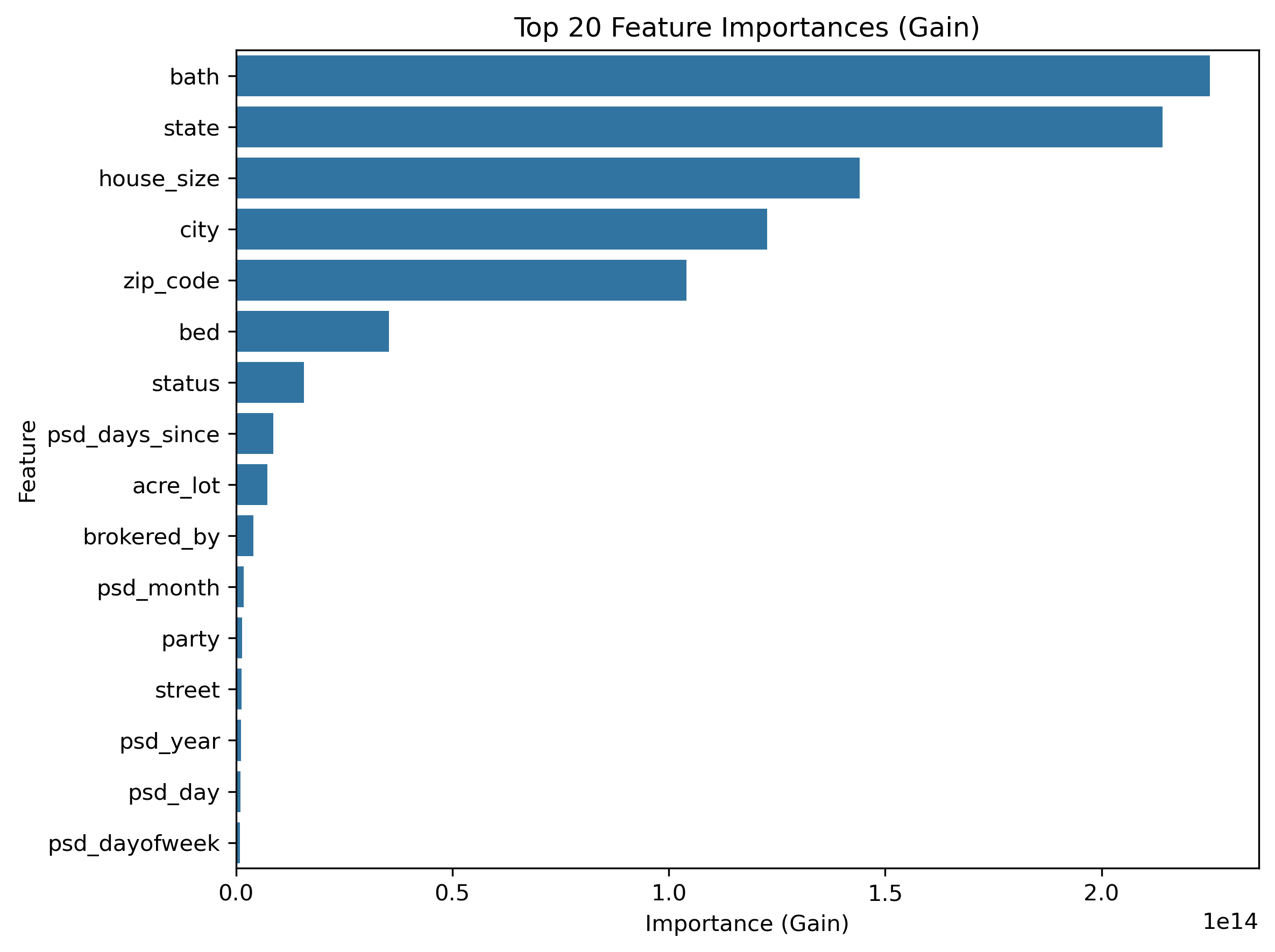
The trends observed in the EDA are reflected in XGBoost’s feature importance rankings. As expected, the number of bathrooms and house size play dominant roles in predicting price. What is more surprising is that the number of bedrooms is less influential than city, zip code, and even party. State, city, and zip code naturally share some collinearity, but each captures different patterns in the housing market, so removing them would result in a loss of meaningful information. Overall, the feature importance results mostly match the insights from the EDA, which gives a realtor confidence that the model’s focus aligns with real-world intuition.

Error By Groups (State & Price)

Code
results = pd.DataFrame({
    "actual": y_test,
    "predicted": y_test_pred,
})
results["residual"] = results["actual"] - results["predicted"]

# Merge back with the original test features to include group columns
results = pd.concat([results, X_test.reset_index(drop=True)], axis=1)
Code
error_by_state = (
    results.groupby("state", observed=True)["residual"]
    .agg(["mean", "std", "count"])
    .sort_values("mean")
)
Code
# Define price bins
bins = [0, 200000, 500000, 1000000, 2000000, float("inf")]
labels = ["<200K", "200K-500K", "500K-1M", "1M-2M", "2M+"]

results["price_bin"] = pd.cut(results["actual"], bins=bins, labels=labels)

error_by_price = (
    results
    .groupby("price_bin", observed=True)["residual"]
    .agg(["mean", "std", "count"])
)
Code
figsize = (10, 10)
fig, axes = plt.subplots(2, 1, figsize=figsize)


sns.barplot(
    data=error_by_state.reset_index(),
    x="state", y="mean", color="skyblue", ax=axes[0]
)
axes[0].axhline(0, color="red", linestyle="--")
axes[0].set_title("Average Prediction Error by State")
axes[0].set_ylabel("Mean Residual (Actual - Predicted)")
axes[0].set_xlabel("State")
axes[0].tick_params(axis="x", rotation=90)


sns.barplot(
    data=error_by_price.reset_index(),
    x="price_bin", y="mean", color="lightgreen", ax=axes[1]
)
axes[1].axhline(0, color="red", linestyle="--")
axes[1].set_title("Average Prediction Error by Price Range")
axes[1].set_xlabel("Price Range")
axes[1].set_ylabel("Mean Residual")

plt.tight_layout()
fig.savefig("error_by_groups.png", format="png", bbox_inches="tight")
plt.close(fig)

Error By Groups Summary

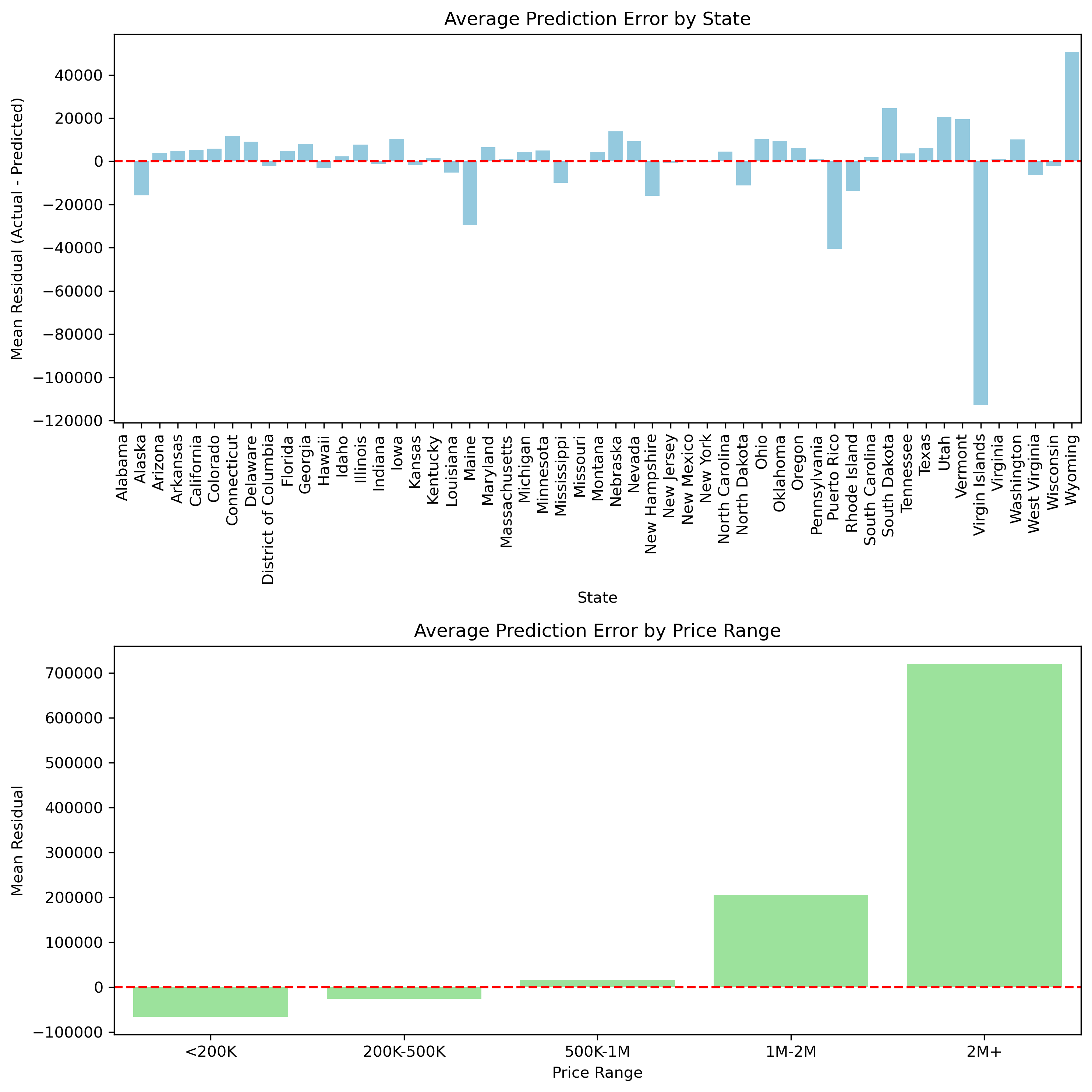
To understand how the model behaves across different segments of the data, I examined grouped residuals. Looking at residuals by state highlights which regions tend to be consistently overpredicted or underpredicted, which is useful for fine-tuning price estimates in specific markets. Grouping errors by price brackets provides additional insight. The model performs most accurately on mid-range homes, while high-end properties show noticeably larger errors. This pattern is consistent with those observed in the EDA, especially in the boxplots, where states with the least volatility in their IQR also tended to have the smallest residuals. Once again, the model reinforces earlier findings, strengthening confidence that the relationships seen in the EDA carry through into the final predictions.

Conclusion

The XGBoost model performed well and achieved a “test set” \(R^2\) of about 0.79. This indicates that the model captured most of the variation in housing prices even though the market is complex. The training \(R^2\) (0.81) and test (0.79) results are very similar, which suggests that the model is not overfitting.

The residual analysis shows that most errors are small and centered around zero. The largest errors appear in high-end homes and a few states. These patterns match the patterns observed in the EDA where differences in volatility and IQR already hinted at uneven behavior across markets. The agreement between the EDA and the model increases confidence that the model is learning real trends rather than noise.

Overall, this project produced a model that is both accurate and practical. A realtor can use it to generate a data-informed starting price for a new property, then refine that estimate further based on local knowledge and factors that the dataset cannot capture.
Thumbnail icon from Freepik